
Differentiate Between @Component and @Bean Annotations in Spring
When navigating the Spring framework, understanding how to properly manage and configure beans is crucial for effective application design. Among the key tools provided by Spring for bean management are the @Component and @Bean annotations. While...
Published
•3 min read
T
I am Tuanh.net. As of 2024, I have accumulated 8 years of experience in backend programming. I am delighted to connect and share my knowledge with everyone.
1. What is @Component?
The @Component annotation is a class-level annotation that marks a Java class as a Spring-managed component. It is a generic stereotype for any Spring-managed component and is often used for classes that define business logic or are otherwise integral to your application's functionality.
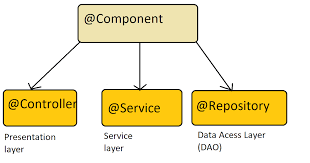
1.1 Key Characteristics of @Component
- Automatic Scanning: Classes annotated with @Component are automatically detected and registered as beans by Spring during component scanning. This is typically done using the @ComponentScan annotation in a configuration class or XML file.
- Component Types: The @Component annotation can be specialized into more specific annotations such as @Service, @Repository, and @Controller, which provide additional semantics and are used to designate service layers, data access layers, and web controllers, respectively.
import org.springframework.stereotype.Component;

@Component
public class MyService {
    public void performService() {
        System.out.println("Service is being performed");
    }
}
In this example, MyService is a Spring-managed bean and can be injected into other components using @Autowired.
What is @Bean?

The @Bean annotation is used in Spring configuration classes to explicitly define a bean. Unlike @Component, which is applied at the class level, @Bean is used within a method in a @Configuration class to create and configure beans programmatically.
2.1 Key Characteristics of @Bean
- Explicit Definition: Beans defined with @Bean are explicitly declared in the configuration class. This provides more control over bean creation and configuration.
- Custom Initialization and Destruction: The @Bean method allows you to specify custom initialization and destruction methods using attributes like initMethod and destroyMethod.
- Bean Scope and Properties: The @Bean annotation offers flexibility in defining the scope of beans and configuring their properties programmatically.
import org.springframework.context.annotation.Bean;
import org.springframework.context.annotation.Configuration;

@Configuration
public class AppConfig {

    @Bean
    public MyService myService() {
        return new MyService();
    }
}
In this example, the myService method creates and returns a new instance of MyService, which is then managed by the Spring container.
3. Comparing @Component and @Bean
3.1 Use Cases for @Component
- Automatic Bean Discovery: Use @Component when you want Spring to automatically detect and manage your beans through classpath scanning.
- Stereotyped Components: Ideal for annotating classes with roles such as @Service, @Repository, or @Controller.
3.2 Use Cases for @Bean
- Custom Bean Configuration: Use @Bean when you need to configure beans programmatically or when you require more control over the bean creation process.
- Complex Initialization: Useful for beans that require complex initialization or when integrating with third-party libraries.
4. Conclusion
Both @Component and @Bean annotations are integral to managing beans in a Spring application, each offering unique advantages. Understanding when and how to use each annotation can greatly enhance your application's flexibility and maintainability.
If you have any questions or need further clarification, feel free to leave a comment below!
Read more at : Differentiate Between @Component and @Bean Annotations in Spring


